How does SAMFlows work
SAMFlows automates moving water from the apparatus or water source to the fire.
SAMFlows controls the intake, discharge, and tank valves, engine speed, primer operation, bleed valves, and tank recirculation to automate the entire pumping process for the operator.
During the critical first five minutes, the pump operator typically has thirteen tasks to complete to supply initial attack crews and establish a water source. With SAMFlows, the operator only has to do three of these tasks, and SAMFlows takes care of the rest. SAMFlows frees up the operator to focus on the crew and fireground conditions.
Once the operator selects discharges to open and selects a water source, SAMFlows does these things in the background:
- Opens tank-to-pump valve
- Charges discharge line and adjusts to set pressure
- Bleeds large dia. hoses or pre-primes to the intake valve and opens the intake
- Closes tank-to-pump and refills the tank
- Monitors intake pressure and switches back to tank if pressure is lost.
How SAMFlows helps in the
first five minutes
During the critical the first five minutes, the pump operator has roughly thirteen tasks to complete to supply initial attack crews and establish a water source. With SAMFlows, the operator only has to do three of these tasks. SAMFlows frees up the operator to focus on the crew and fireground conditions.
| Initial Attack Phase | ||
| Open tank-to-pump |  |
|
| Set pressure governor to bar | |
|
| (Select line and give SAMFlows set pressure) |  |
|
| Open first discharge | |
|
| Adjust governor setting to desired discharge pressure | |
|
| (Select line and give SAMFlows set pressure) | |
|
| Open second discharge | |
|
| Adjust valve to obtain desired pressure | |
|
| Establish Water Source | ||
| (Tell SAMFlows transition to hydrant) | |
|
| Bleed LDH | |
|
| Slowly open intake valve to minimize disruption to discharge pressure | |
|
| If hydrant pressure is too high, gate discharge valves | |
|
| Close tank-to-pump | |
|
| Open tank fill valve and refill tank | |
|
| Check discharge 1 and 2 and feather as needed | |
|
| Close tank fill valve once tank is full | |
|
| 13 TASKS | 3 TASKS = time to focus |
|
SAMFlows Operator Interfaces
-
Two Operator Interfaces for complete control of your water flow
TWO OPERATOR INTERFACES FOR COMPLETE CONTROL OF YOUR WATER FLOW
The SAMFlows control system provides complete water control to and from the pump with two interfaces, the SAMFlows control centre and the pump controller.

-
SAMFlows Control Centre
SAMFLOWS CONTROL CENTRE
The Control Centre gives the operator an instant snapshot of intakes, discharges and tank status and allows them to quickly and easily manage water flow. The control centre is the primary control interface, and during most operations it is the only screen the pump operator will need to use.

-
SAMFlows Pump Controller
SAMFLOWS PUMP CONTROLLER
The SAMFlows pump controller is supplementary to the SAMFlows control centre and used primarily for reference information. When the system is in manual mode, the pump controller will have a pressure governor interface allowing the operator to select Bar or RPM mode and directly control the master discharge set pressure or engine speed.
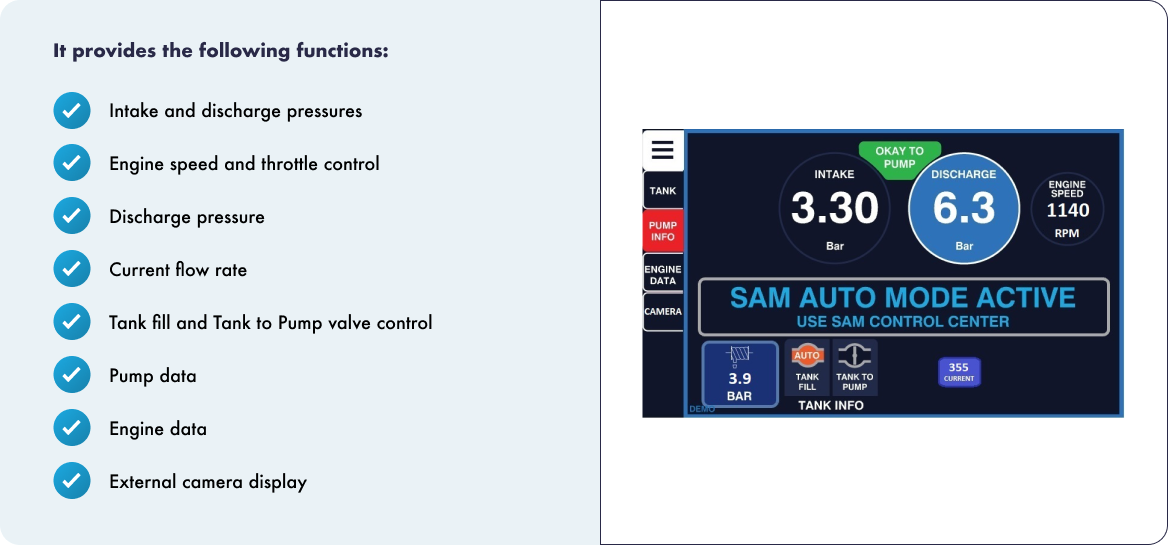
ADDITIONAL PUMP CONTROLLER SCREENS
